
The Essential Tools Stack for Small Photography Businesses
Discover the essential tools every small photography business needs to stay organized, get paid, and scale—from asset management to billing and marketing.

Running a successful photography business requires far more than creating beautiful images—it demands managing thousands of digital files, coordinating client relationships, tracking time and project workflows, and building sustainable growth without your operational systems collapsing under their own weight.
The uncomfortable truth that many photographers discover too late: most photography businesses don't fail because of insufficient creative talent. They struggle and ultimately stagnate because their operational systems can't scale beyond the early hustle phase.
This comprehensive guide breaks down the five core tool categories every small photography business genuinely needs to thrive, explains how these systems fit together into a cohesive operational workflow, identifies where most photographers make costly mistakes when selecting these tools, and provides a practical roadmap for building a technology stack that supports sustainable growth rather than creating additional chaos.
If you want fewer administrative headaches, more time for creative work, and a photography business that can actually scale beyond your personal capacity limits, this is the essential tools stack you need to build.
Digital Asset Management (DAM): The Foundation Everything Runs On
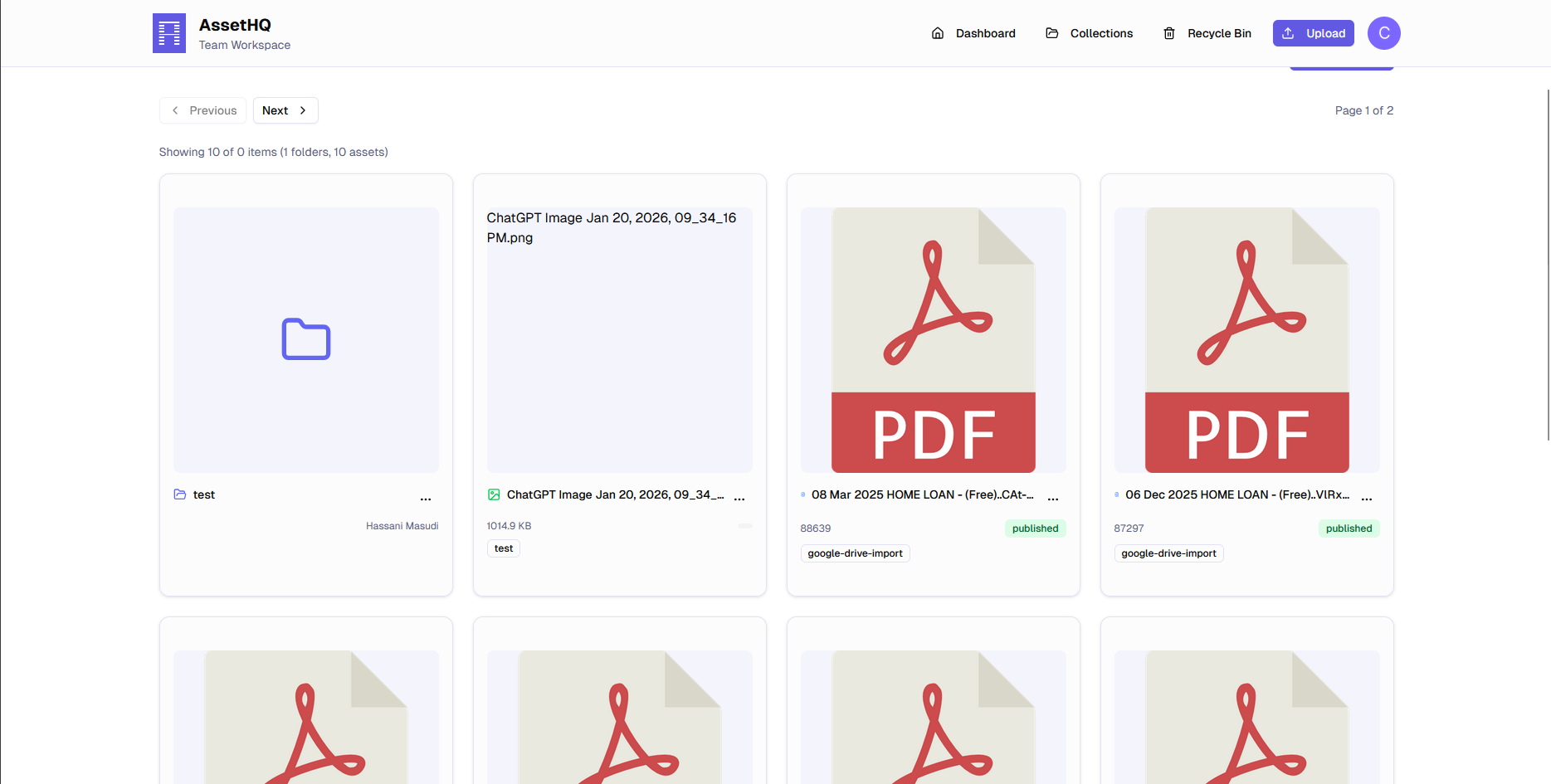
Featured: assethq.io
Every photography business is fundamentally built on digital assets. When you lose control of your files—when you can't find them, access them efficiently, or understand their usage context—everything else in your business becomes exponentially harder: client service suffers, billing becomes complicated, marketing grinds to a halt, and growth opportunities disappear.
A Digital Asset Management (DAM) system isn't just storage infrastructure—it's where the operational heart of your photography business actually lives.
Why Traditional Folder Systems Inevitably Break Down
Manual folder organization and scattered external drives work adequately when you're just starting out. Then operational reality hits hard:
- Hundreds or thousands of photoshoots accumulated across multiple years
- Clients requesting specific images from projects completed months or years ago
- Marketing teams pulling relevant content from your entire back catalog
- Editors, assistants, and collaborators needing reliable access to specific asset sets
- Multiple devices, cloud services, and storage locations fragmenting your library
- Inconsistent naming conventions making systematic organization impossible
- Version confusion between RAW originals, edited masters, and client deliverables
At this inflection point, traditional folder-based systems stop scaling effectively because they fundamentally aren't designed to be searchable, flexible, or collaborative at the volumes professional photography businesses generate.
What Professional Digital Asset Management Actually Solves
A photographer-focused DAM platform like assethq.io provides photography businesses with:
Centralized Asset Libraries: One authoritative system for all your photographs, videos, and related creative assets—eliminating fragmentation across laptops, external drives, and disparate cloud services.
Intelligent Search Capabilities: Fast, powerful search functionality using comprehensive tags, customizable metadata fields, and intelligent keywords that make finding any image from your entire career nearly instantaneous.
Clear Version Control: Systematic separation and tracking of RAW originals, edited working files, and final client deliverables—preventing costly confusion about which version represents what.
Controlled Collaborative Sharing: Secure, permission-based sharing with clients, creative partners, editors, and stakeholders without losing control of your intellectual property or creating organizational chaos.
Strategic Asset Reuse: The ability to efficiently identify and leverage existing work for portfolio development, marketing campaigns, and new project inspiration—turning your back catalog into an active business resource rather than an inaccessible archive.
Instead of perpetually managing storage chaos and fighting file disorganization, professional DAM allows you to manage your creative assets intentionally and strategically.
Bottom line: If you want to scale your photography business, a DAM isn’t optional—it’s foundational.
Editing & Post-Production Software: Speed and Consistency

Recommended Options: Adobe Lightroom, Capture One, Photopea
Photo editing and post-production represents where professional photographers spend the largest portion of their working time, which means efficiency improvements in this domain create outsized positive impact across your entire business.
Professional editing software enables photographers to:
Process at Scale Batch process hundreds or thousands of images from large shoots efficiently using presets, synchronization, and automated workflows.
Maintain Visual Consistency Develop and apply signature editing styles consistently across different shoots, creating recognizable brand aesthetics that clients come to expect and value.
Deliver Faster Without Compromising Quality Streamline repetitive editing tasks without cutting creative corners, enabling faster turnaround times that improve client satisfaction and allow higher project volume.
Choosing the Right Editing Tool for Your Photography Business
Different photography specialties benefit from different editing platforms:
Adobe Lightroom works exceptionally well for high-volume workflows including weddings, events, portrait sessions, and editorial assignments where cataloging and batch processing thousands of images efficiently is paramount.
Capture One excels in commercial studio environments, product photography, and fashion work where tethered shooting, precise color accuracy, and layer-based editing provide meaningful creative advantages.
Photopea offers a surprisingly capable free web-based alternative that mimics Photoshop functionality, making it an excellent option for photographers with budget constraints or those who need occasional advanced editing without subscription commitments.
The Critical Post-Editing Workflow Gap Most Photographers Miss
Here's the costly mistake that undermines even excellent editing workflows: The biggest problem photographers face isn't which editor they choose—it's what happens to their finished assets after editing is complete.
Too many photographers export final deliverables and then dump them into generic folders or inconsistent cloud storage, where they become effectively lost within weeks. This represents a massive missed opportunity and operational inefficiency.
The solution: Final edited assets should systematically flow into a professional DAM platform like assethq.io, where they become permanently searchable, easily reusable for future marketing and portfolio needs, and properly protected with metadata about usage rights and licensing context.
This post-editing integration transforms your completed work from scattered files into organized business assets that continue delivering value long after the original project concludes.
Client Management & Booking Tools: Protect Your Time
Recommended Options: HoneyBook, Studio Ninja
Photography businesses don't just manage images and creative projects—they manage complex human relationships, packed schedules, evolving client expectations, and countless administrative details that can quickly spiral into overwhelming chaos.
Professional client management tools (often called CRMs—Customer Relationship Management systems) help photographers:
Track and Nurture Leads: Capture inquiry details, track communication history, and systematically follow up with potential clients without losing opportunities in overflowing email inboxes.
Streamline Contract and Onboarding Workflows: Send professional contracts, questionnaires, and client onboarding documents through automated workflows that maintain consistency and save hours of repetitive administrative work.
Automate Communication and Reminders: Set up automated email sequences for booking confirmations, pre-shoot reminders, delivery notifications, and post-project follow-ups that maintain professional communication without manual effort.
Manage Complex Calendars and Bookings: Coordinate shoot schedules, consultation calls, delivery deadlines, and availability calendars in one centralized system that prevents double-bookings and scheduling chaos.
Why Client Management Deserves Dedicated Tools
This isn't about adding fancy technology for its own sake or appearing more sophisticated. Professional client management tools address a genuine operational problem: avoiding dropped communication, missed follow-ups, forgotten deadlines, and the endless stream of small administrative tasks that quietly drain creative energy and damage professional reputation.
The Integration That Multiplies Value
When professional client management systems are paired with proper digital asset management, something powerful happens: client records stay meaningfully connected to the actual creative assets associated with each project instead of existing as disconnected information scattered across email threads, spreadsheets, and random folder structures.
This integration enables photographers to:
- Instantly locate all assets delivered for specific client projects
- Quickly reference previous work when clients return for additional services
- Understand complete client relationship history in context
- Deliver consistent, professional experiences that build loyalty
The combination of client management and asset management working together creates operational clarity that solo tools simply can't match.
Billing & Invoicing Tools: Get Paid Cleanly and On Time

Recommended Platforms: QuickBooks, FreshBooks, Wave
Billing and invoicing represents another domain where many photographers try to "keep things simple" by cobbling together manual processes or relying on basic spreadsheets—and this shortsighted approach frequently becomes exactly where serious operational and financial problems start emerging.
Dedicated billing and invoicing tools enable photography businesses to:
Create Professional Invoices Rapidly: Generate polished, branded invoices in minutes instead of rebuilding them manually in Word or Excel for every client project.
Accept Online Payments and Deposits: Integrate secure payment processing that allows clients to pay instantly via credit card, bank transfer, or digital payment platforms—dramatically reducing payment delays.
Track Financial Status in Real-Time: Maintain clear visibility into paid invoices, unpaid balances, overdue accounts, and overall cash flow without piecing together information from multiple sources.
Handle Complex Payment Structures: Easily manage retainers, milestone-based payments, installment plans, and partial deposits that are common in professional photography contracts.
Maintain Clean Financial Records: Build proper financial documentation for tax preparation, accounting purposes, and business planning that saves significant headaches during tax season.
Why Billing Deserves Its Own Dedicated Tool
Some client management platforms include basic invoicing functionality as an add-on feature. While convenient for very simple billing needs, dedicated financial tools like QuickBooks or FreshBooks provide substantially more powerful capabilities that become increasingly important as photography business revenue grows:
- Accurate cash flow tracking that helps you understand actual business financial health
- Professional financial reporting for tax preparation, loan applications, and business planning
- Seamless integration with accountants, bookkeepers, and tax professionals
- Expense tracking and categorization for understanding true project profitability
- Automated payment reminders that reduce awkward collection conversations
How Billing and Asset Management Connect to Protect Revenue
Here's a critical connection many photographers overlook: Billing tools handle money flow. Digital Asset Management handles value creation.
When your creative assets are properly organized and tracked in a DAM platform like assethq.io, several important billing-related benefits emerge:
Clear Deliverable Documentation You maintain precise records of exactly which assets were delivered for each invoice, preventing disputes about scope and ensuring clients receive everything they paid for.
License and Usage Reference You can quickly reference previously paid or licensed work when clients request additional usage rights, ensuring you're compensated fairly for expanded usage.
Proper Pricing for Asset Reuse You avoid accidentally undercharging for image reuse, additional licensing, or extended usage rights because you have clear records of original agreements and deliverables.
Intellectual Property Protection You maintain documentation of asset creation dates, client usage grants, and licensing limitations that protect your creative work and revenue streams.
For commercial photographers, brand photographers, and anyone licensing images, this connection between billing systems and asset management becomes especially crucial. Your photographs aren't merely deliverable files—they're valuable business assets directly tied to current and potential future revenue streams.
Online Galleries & Client Delivery: Presentation Is Part of the Product

Recommended Platforms: Pixieset, ShootProof
How you deliver finished work to clients is part of your overall brand experience and professional reputation. Sending files through generic WeTransfer links or Dropbox folders undermines the premium positioning you've worked to establish.
Professional online gallery tools provide:
Polished Client Galleries: Beautiful, customizable presentation interfaces that showcase your work professionally and reinforce your brand standards.
Streamlined Proofing and Selection: Built-in tools for client image selection, favoriting, and decision-making that eliminate back-and-forth email confusion.
Convenient Downloads and Optional Print Sales: Easy client access to high-resolution downloads, plus integrated print fulfillment options that can generate additional passive revenue.
Mobile-Optimized Experiences: Responsive galleries that work beautifully on phones and tablets, meeting modern client expectations for anywhere access.
Understanding What Gallery Tools Don't Do Well
Here's the important distinction many photographers miss: Online gallery platforms excel at short-term, client-facing delivery and presentation—but they're explicitly not designed for long-term asset management, systematic organization, or strategic reuse.
Most gallery platforms:
- Delete files after 30-90 days to manage storage costs
- Lack comprehensive metadata and tagging capabilities
- Don't support complex searching across your entire archive
- Aren't built for collaboration with creative teams
- Don't integrate well with broader business workflows
The Smart Dual-System Approach
Professional photography workflows use both gallery platforms and DAM systems strategically:
Online Galleries for immediate client presentation, selection, and delivery Digital Asset Management (like assethq.io) for permanent storage, systematic organization, metadata enrichment, and long-term strategic reuse
This approach keeps your client experience polished while ensuring your valuable creative archive remains clean, searchable, and future-proof for marketing, portfolio development, and licensing opportunities.
Marketing & Website Platforms: Turn Work Into Growth
Recommended Solutions: Squarespace, WordPress, Instagram
Your best photography work shouldn't live once in a client delivery and then disappear from sight forever. Strategic marketing ensures your creative efforts compound over time by attracting new opportunities, building professional authority, and creating multiple touchpoints with ideal clients.
Marketing platforms help photographers:
Build Search Visibility Create SEO-optimized website content that helps potential clients discover your work through organic search.
Showcase Creative Authority and Signature Style Develop comprehensive portfolios and case studies that demonstrate your capabilities and unique visual approach.
Attract Repeat and Referral Business Stay visible with past clients and their networks, generating word-of-mouth growth and repeat bookings.
Establish Market Positioning Communicate your specialization, pricing tier, and ideal client profile clearly to attract better-fit opportunities.
The Marketing Speed Challenge
The persistent challenge with photography marketing is execution speed. Effective marketing often requires pulling compelling images from years of accumulated work to create portfolio pieces, case studies, blog posts, social media content, and email campaigns.
Without proper asset organization, this becomes impossibly time-consuming. You know you've captured amazing work, but you can't locate the right images when you need them. Marketing transforms from strategic business development into frustrating digital archaeology.
How DAM Accelerates Marketing Effectiveness
With a professional Digital Asset Management system like assethq.io, marketing execution becomes dramatically faster and more effective:
Instant Asset Discovery Find high-performing images from your entire career archive in seconds using keyword search, metadata filtering, and visual browsing.
Strategic Asset Reuse Systematically leverage your best work across multiple marketing campaigns, channels, and touchpoints without recreating content from scratch constantly.
Visual Consistency Maintain coherent brand aesthetics across your website, social media, email marketing, and promotional materials by easily accessing style-consistent images.
Portfolio Development Quickly assemble targeted portfolio collections for different photography specialties or ideal client types by filtering your organized archive.
Content Calendar Planning Build months of social media and blog content efficiently by browsing organized collections rather than random folder diving.
Proper organization transforms marketing from an overwhelming chore into a systematic business development process that actually gets done consistently.
How the Full Stack Works Together
A truly scalable photography business workflow integrates all these tools into a cohesive operational system:
Capture → Edit → Store & Organize → Invoice → Deliver → Market & Reuse
Most photographers treat storage/organization and billing/invoicing as disconnected afterthoughts to be dealt with "when there's time." In reality, those two foundational systems determine how smoothly everything else in your business operates.
The DAM as Central Hub
Digital Asset Management sits at the operational center of professional photography businesses, connecting:
- Creative work (edited finals) to client records (who owns what)
- Delivered projects to billing history (what was paid for)
- Completed shoots to marketing assets (what can be leveraged)
- Individual files to business context (usage rights, licensing, restrictions)
When your DAM functions as the authoritative hub that connects creative output to business operations, the entire system becomes more coherent, efficient, and valuable than the sum of individual tools.
A scalable photography workflow looks like this:
Shoot → Edit → Store → Bill → Deliver → Reuse
Most photographers treat storage and billing as afterthoughts. In reality, those two systems determine how smoothly everything else runs.
A DAM sits at the center, connecting creative work to operations, revenue, and growth.
Final Thought: Build the System Once
You don't need dozens of disconnected tools creating operational complexity. You need the right essential stack, working together cohesively.
Start with these five core categories:
- Solid DAM foundation (assethq.io for organized, searchable asset management)
- Reliable editing software (Lightroom, Capture One, or Photopea matched to your specialty)
- Professional client management (HoneyBook, Dubsado, or Studio Ninja for operational clarity)
- Proper billing and invoicing (QuickBooks, FreshBooks, or Wave for financial health)
- Clean delivery and focused marketing (Pixieset for galleries, Squarespace/WordPress for web presence)
That's how professional photography businesses grow sustainably without operational chaos—and without needing to tear everything down and rebuild your systems every 12-18 months as you scale.
Build the foundation correctly from the start. Your future self will thank you.
You don’t need dozens of tools. You need the right stack, working together.
Start with:
- A solid DAM foundation
- Reliable editing software
- Client management
- Proper billing and invoicing
- Clean delivery and focused marketing
That’s how photography businesses grow without chaos—and without rebuilding everything later.